My private infrastructure is monitored using Icinga2. The configuration is rolled out across all devices using Icinga Director. That works reliable.
However some services are quite noisy, for no good reason.
Let’s look at one example.
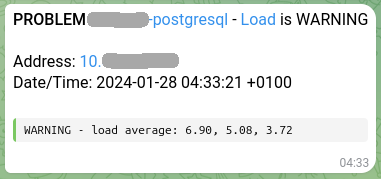
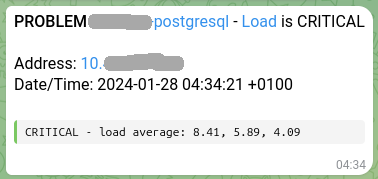


All in less than 30 minutes. Nothing to worry about.
The Load on a system goes up over night, because a backup is running. That is not unusual, and will “solve itself” after a while. In fact it happens every night, but at different times on different systems. Laptops at home use different backup times than servers. This makes using scheduled downtimes complicated.
In such a case I don’t need a notification right when the problem occurs. Only if the problem persists for a prolonged period of time. Alarm fatigue is a thing, and more important notifications go missing among all the less or not relevant noise.
How to configure Icinga Director to delay the notifications for certain services.
Current Status
Being the - almost - sole user of my monitoring system, I don’t have many notification rules and a rather simple setup: send notifications per email, and per Telegram.
For this, I have a generic-notification-template template:
| |
This template covers the basics, like what to notify about in general, and how often to repeat the notification.
Then the basic template is imported by the service-notification-telegram-template template:
| |
Here it gets more specific. I overwrite the states I’m interested in for the Telegram notifications. And specify which user(s) are notified.
Then basic and the Telegram templates are applied to services, using notification rules:
| |
This sends all notifications to a dedicated Telegram channel. The configuration for users, and for Telegram, is defined in other configuration parts. Not part of this task here. A similar setup exists for sending emails. Nothing special really.
Delay notifications
For delayed notifications, Icinga2 has a built-in feature: First notification delay.
This is used in a new template service-notification-telegram-template-delayed, which includes the existing service-notification-telegram-template and adds the times.begin setting.
| |
This sets the delay to 3 hours, and ensures that I only have to change/modify/update the service-notification-telegram-template template and get all settings also for the delayed notifications. Quite handy.
I also need to modify the Service Notification (all) apply rule, and exclude all the services for which I want delayed notifications.
| |
And of course apply the new template to the services for which I want the delayed notifications:
| |
In Service Notification (all) I added the part which excluded services by name.
In the all new Service Notification Delayed (Telegram) I include the new template for all services listed here (Load and Apt Updates).
Roll out the new configuration in Director, and enjoy fewer notifications!
Next steps
Another way to manage this can be a custom label for services. If the label is set then the delayed notification template applies.
Will investigate that at some point, after I see that the current setup runs stable.
What is Icinga2
Icinga2 is a network monitoring tool. It is used to ensure the availability of IT infrastructure components. Icinga2 is Open Source and is available under the GNU General Public License Version 2.
It’s used to monitor various aspects of services, applications, servers, but also the network devices and the network itself.
Icinga Director allows the rapid configuration of a large number of hosts, devices and services using an intuitive webfrontend.
Alerting about problems is configurabe, and allows to use a large number of services, as well as a detailed configuration of the alerting itself - as shown in this article.
Comments
With an account on the Fediverse or Mastodon, you can respond to this post. Known replies are displayed below:
Note: This will load data from mastodon.social.
Learn how this is implemented here.
Share: